On-device redaction · macOS 14+
Share the context
not the data.
Grab the screen, scrub out the personal details, and share it. No cloud, no uploads, it never leaves your Mac.
One-time payment, lifetime updates.
Payment details
- Account name
- Jordan Avery
- Sort code
- Account number
- Card number
- Balance
Why scrub on your Mac
A black box isn't redaction.
Drawing a rectangle over an email still leaves the email in the file. Uploading a screenshot to a blur site hands it to a stranger to fix. ScrubShot rewrites the pixels on your own machine, so the sensitive thing is genuinely gone before the image goes anywhere.
The usual way
- Where the image goes
- Uploaded to a blur website you don't control.
- Black boxes
- Sit on top. Delete the box, the secret is back.
- Cropping it out
- You lose half the screenshot to hide one line.
- Every time
- Open a browser tab, paste, download, repeat.
ScrubShot
- Where the image goes
- Nowhere. It never leaves your Mac.
- Black boxes
- No box. The pixels are rewritten, gone for good.
- Cropping it out
- Keep the whole shot, scrub only the private bits.
- Every time
- One keyboard shortcut, straight to the clipboard.
The product
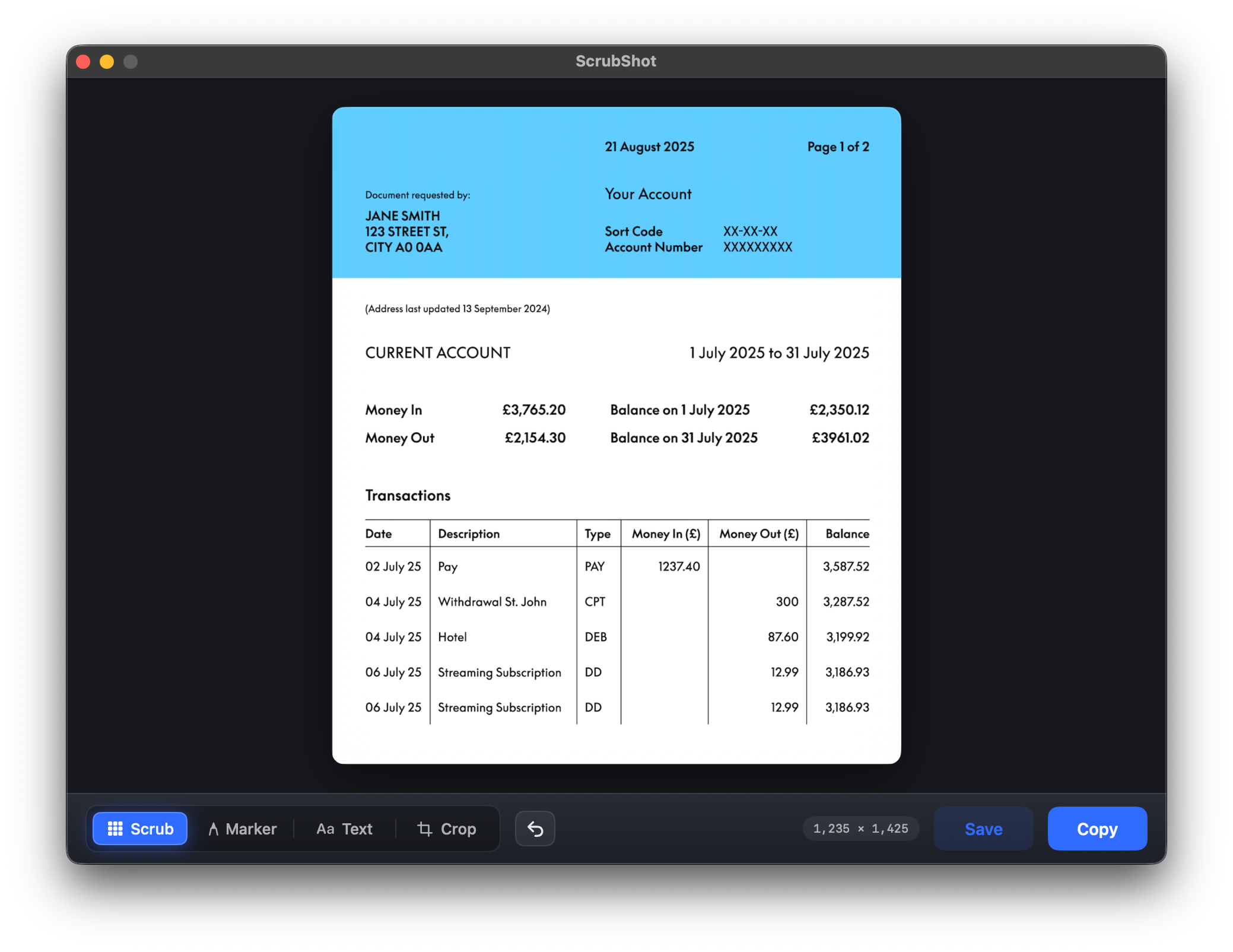
One shortcut in. One editor. That's the whole app.
The trigger
Press it anywhere, in any app, on any monitor. ScrubShot grabs the screen under your cursor and opens it in the editor. No Dock clutter while you work.
The editor
Crop down, scrub out anything private, add an arrow or a note, then copy or save. The tools sit along the bottom and it opens sized to your screen, so there's never a letterbox.
How it works
Three steps, start to share.
Press the shortcut
Hit Fn + Space anywhere. ScrubShot grabs the whole screen under your cursor and opens it in the editor. No fiddly drag-to-select that misses the window.
Scrub and mark up
Crop down to what matters, then scrub out anything private: emails, keys, faces, account numbers. Add an arrow or a note with the marker and text tools.
Copy or save
Copy straight to the clipboard for a quick paste, or let it save to your Pictures folder automatically. The sensitive bits are already gone before it leaves.
The editor
Four tools, nothing more.
No sprawling palette, no panels to learn. Scrub out what's private, point at what matters, crop, and share. That's the editor.
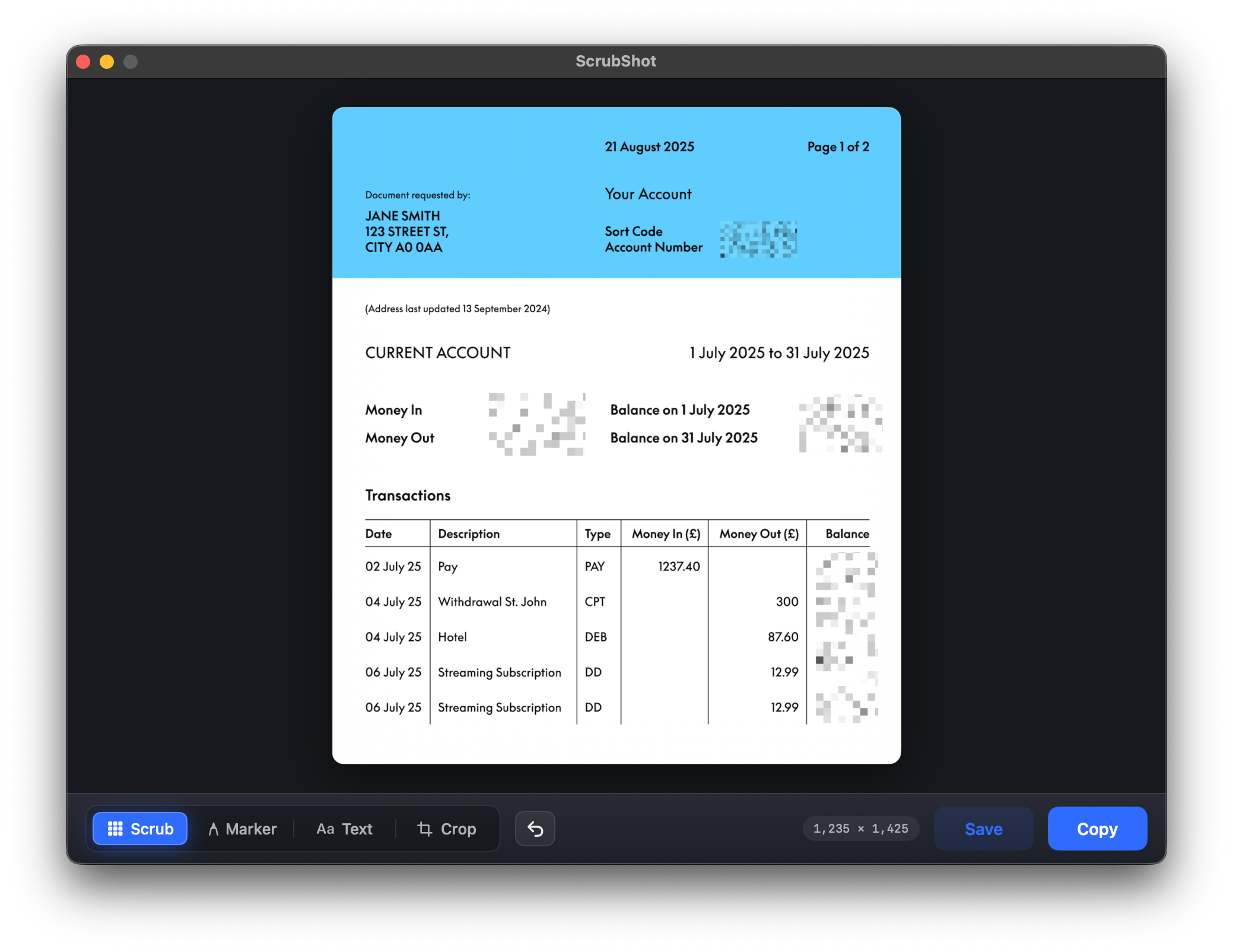
Tool 01
Scrub
Paint over anything private and ScrubShot pixelates those pixels into the image. Account numbers, sort codes, balances, gone for good, not just hidden behind a box.
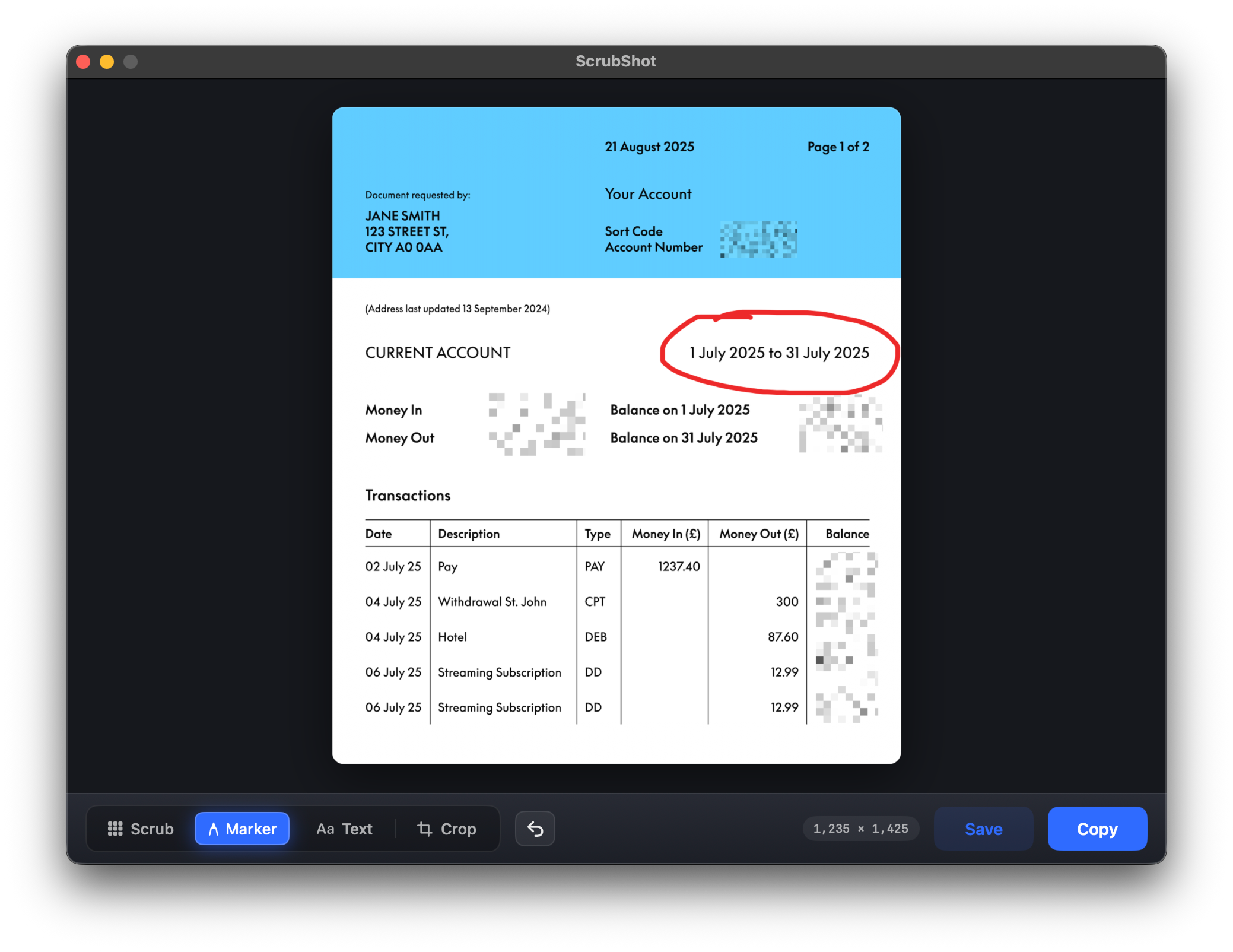
Tool 02
Marker
Circle the thing that matters or draw an arrow to it. One annotation color, a steady line that reads as a pointer rather than a doodle, and undo whenever you change your mind.
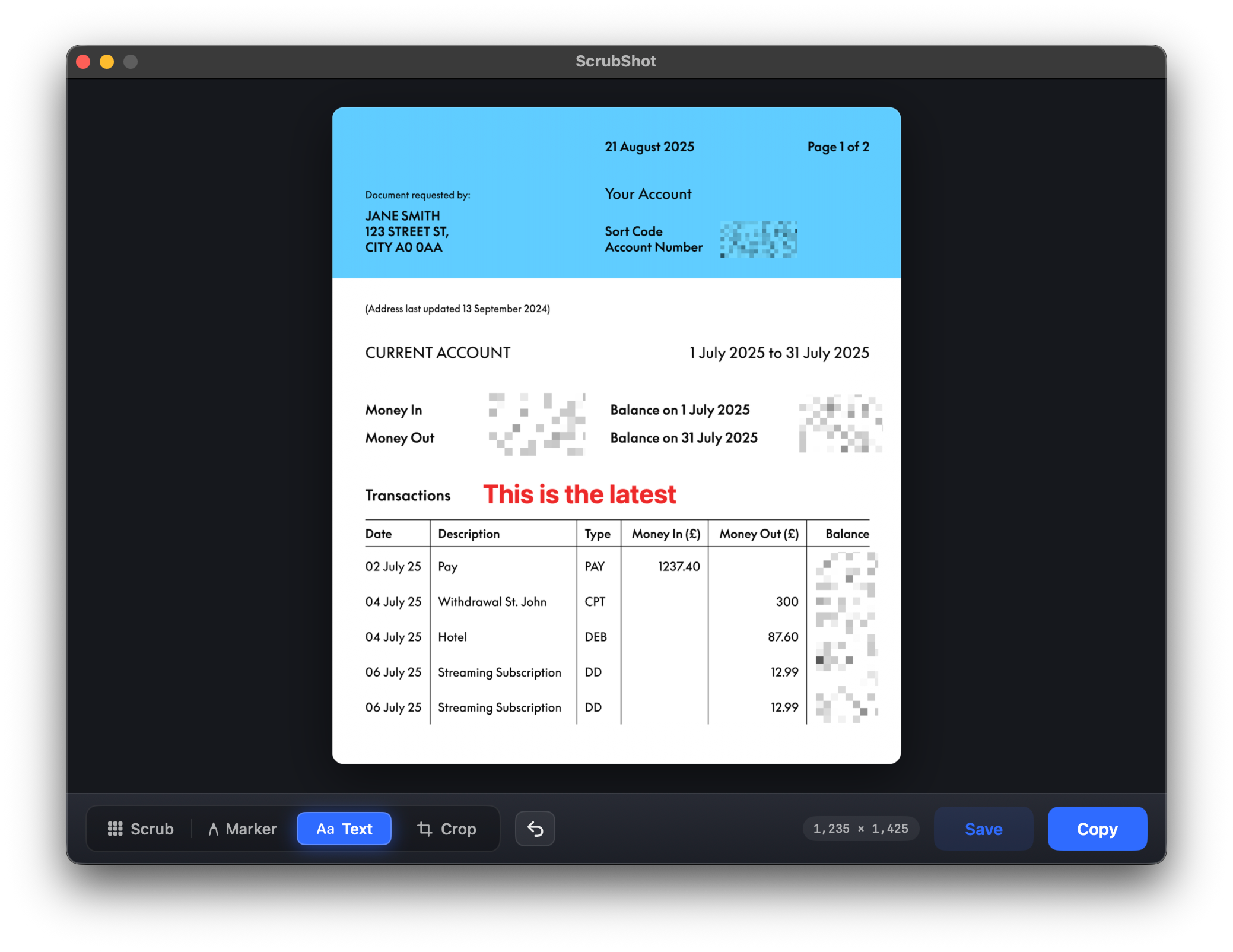
Tool 03
Text
Drop a short label right on the image. Useful for a quick "this one" or a note to whoever you are sending it to. Click, type, and the words are baked into the screenshot itself.
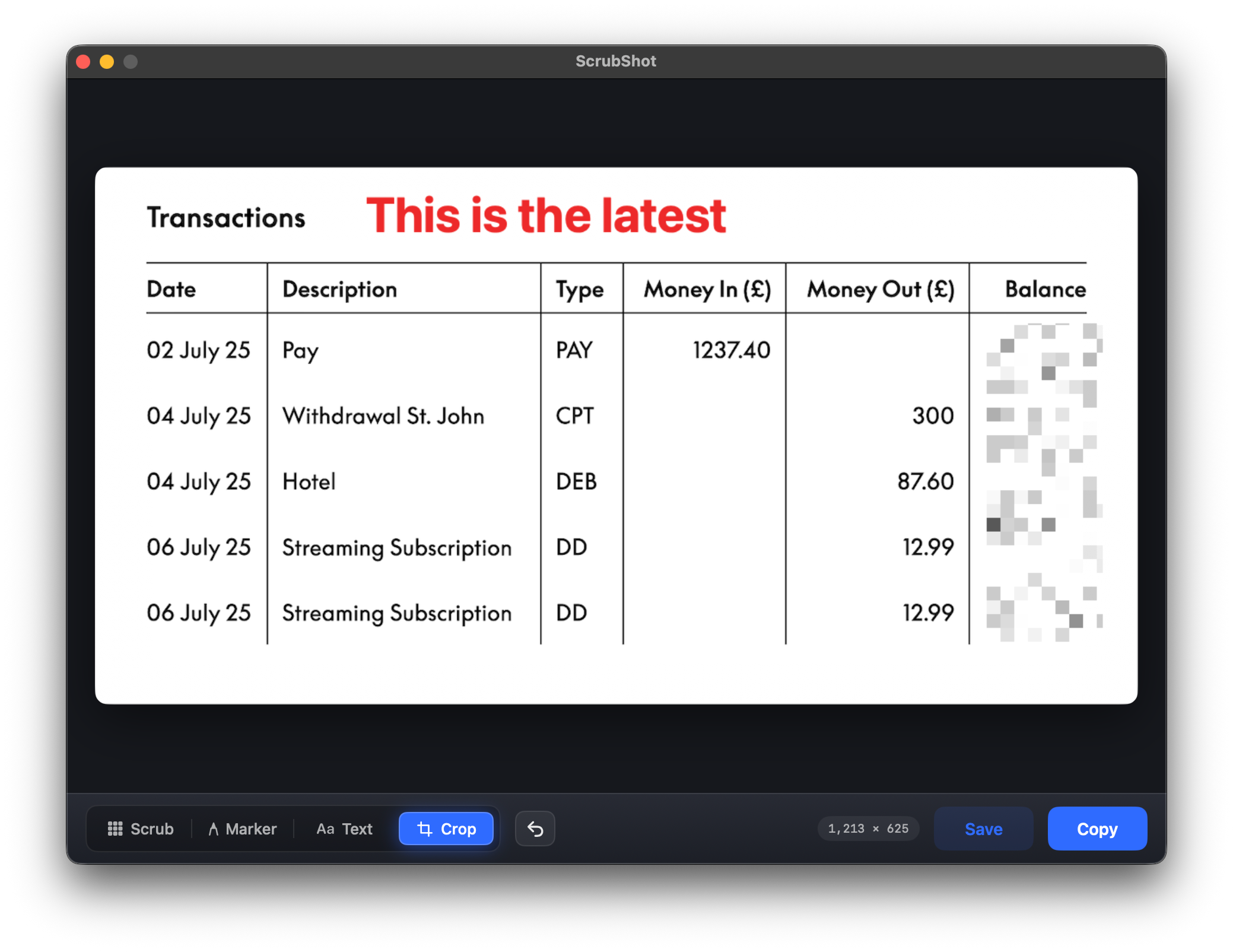
Tool 04
Crop
Trim the full-screen grab down to just the part worth sharing. Then copy it to the clipboard or let it save to your Pictures folder, ready to paste wherever it needs to go.
Specs
Exactly what ScrubShot is.
Real facts, no marketing rounding. If a row matters to you, this is what's actually behind it.
Capture
Full screen under the cursor
ScreenCaptureKit, every app and monitor
Scrub
Destructive pixelation
Pixels rewritten in the image, not an overlay
Tools
Scrub, Marker, Text, Crop
With undo, and nothing more
Saved to
~/Pictures/ScrubShot
Plus copy to clipboard on demand
Network use
Update check only
Anonymous check for the latest version; nothing else
Requirements
macOS 14 or later
Universal app, Apple Silicon and Intel
The only network call ScrubShot makes is an anonymous version check. Your screenshots, and everything you scrub out of them, never leave your Mac, from capture to clipboard.
Why this exists
Built because sharing a screenshot shouldn't be risky.
Everyone has sent a screenshot and then spotted, a beat too late, the email address or the account number sitting in the corner. The usual fixes are worse than they look: a black rectangle you can lift straight off, or a blur website that wants your screen uploaded to fix it.
So I built the opposite. Press a shortcut, the whole screen is captured, and you scrub the sensitive bits out right there on your Mac. The pixels are rewritten, not covered, so there's nothing left underneath. Your screenshots are never uploaded, because a redaction tool that ships your screen off to be fixed is missing the entire point.
Everything else was left out on purpose. No bloated palette, no account, no cloud. ScrubShot does capture, scrub and share well, and stays out of your way the rest of the time.
Early users
What early users are saying.
"I used to crop a screenshot half to death trying to hide one account number. Now I grab the whole thing, scrub the bits that matter, and they're genuinely gone. No black box someone can drag off later."
Priya S.
Operations lead
"The thing that sold me is that my screenshots never get uploaded. I handle client data all day, and a redaction tool that ships it off to be fixed was never going to fly. ScrubShot does the lot on my own Mac."
Daniel R.
Freelance developer
"Fn and space, scrub, copy, paste, and a statement's safe to send in about three seconds. I'm in sort codes and balances all day, so hiding them without cropping half the page off is exactly what I needed. It does that one job."
Hannah M.
Accountant
Questions
Things people ask.
You paint over the area you want to hide and ScrubShot replaces it with a mosaic written directly into the image. It is a destructive edit, not an overlay sitting on top, and the blocks are not computed from the pixels they cover, so once you copy or save there is nothing underneath to recover.
It can have a go at ordinary pixelation, because there each block is the average of the pixels it covers, and for screenshot text in a known font those averages can be brute-forced back out. ScrubShot does not work that way. The blocks in a scrubbed area are random samples of the colors in the region, not averages of what sat underneath, so there is no signal for depixelation software to match against. The only thing the mosaic reveals is the rough color mix of the area. The longer version, including what AI enhancement can and cannot actually recover, is in whether pixelation can be reversed.
Dragging a selection box across other apps is unreliable on current macOS, so ScrubShot grabs the full screen under your cursor and lets you crop in the editor instead. You always get the shot, then trim it down to what matters.
Every capture is saved to ~/Pictures/ScrubShot, and you can copy to the clipboard at any time. They stay on your Mac. ScrubShot does not upload anything anywhere.
Your screenshots are never uploaded, and there is no account, no analytics and no telemetry. The one network call ScrubShot makes is an anonymous check for the latest version, and nothing about you or your screenshots is sent with it. The image, and everything you scrub out of it, never leaves your machine.
Screen Recording, so it can capture the screen, and Accessibility, so the keyboard shortcut works system-wide. You grant both once on first launch and can revoke them in System Settings whenever you like.
Any Mac running macOS 14 or later, Apple Silicon or Intel. ScrubShot ships as a universal app and installs by direct download, not through the Mac App Store.
ScrubShot is $30, paid once. That gets you the app and every future update for as long as I keep building it. There is no subscription, no annual license, and no separate seats to buy.
Yes. Every Mac gets a free 7-day trial, no card on file. It is the same app as the paid version. After the week, you can either let it expire or pay $30 once.
No. It installs by direct download. App Store sandboxing gets in the way of capturing the whole screen and working across other apps, so a direct download is the supported way to install it.
Nothing left to leak
Take the shot.
Scrub it.
Share it.
Stop cropping out half the screen to hide one email. Capture it all, scrub what's private, and send it on with nothing left to leak.
Lifetime license $30One-time payment, lifetime updates.